> ## Documentation Index
> Fetch the complete documentation index at: https://docs.baserun.ai/llms.txt
> Use this file to discover all available pages before exploring further.
# Tracing
Update your Python SDK to version 2.0 for enhanced stability and easier
integration. [Learn more](../SDK_2.0/python/tracing)
Tracing is useful for debugging and monitoring chained LLM calls (workflow) or a single LLM call.
### Features
* Is model and framework agnostic
* Provides token usage, estimated cost, duration, input, and output
* UI to show sequence of events
* Supports evaluation
* Supports annotation
* Supports user feedback
* Supports async functions
* Option to add custom trace name
* Option to log custom metadata
* Option to set trace result
## Logging LLM requests
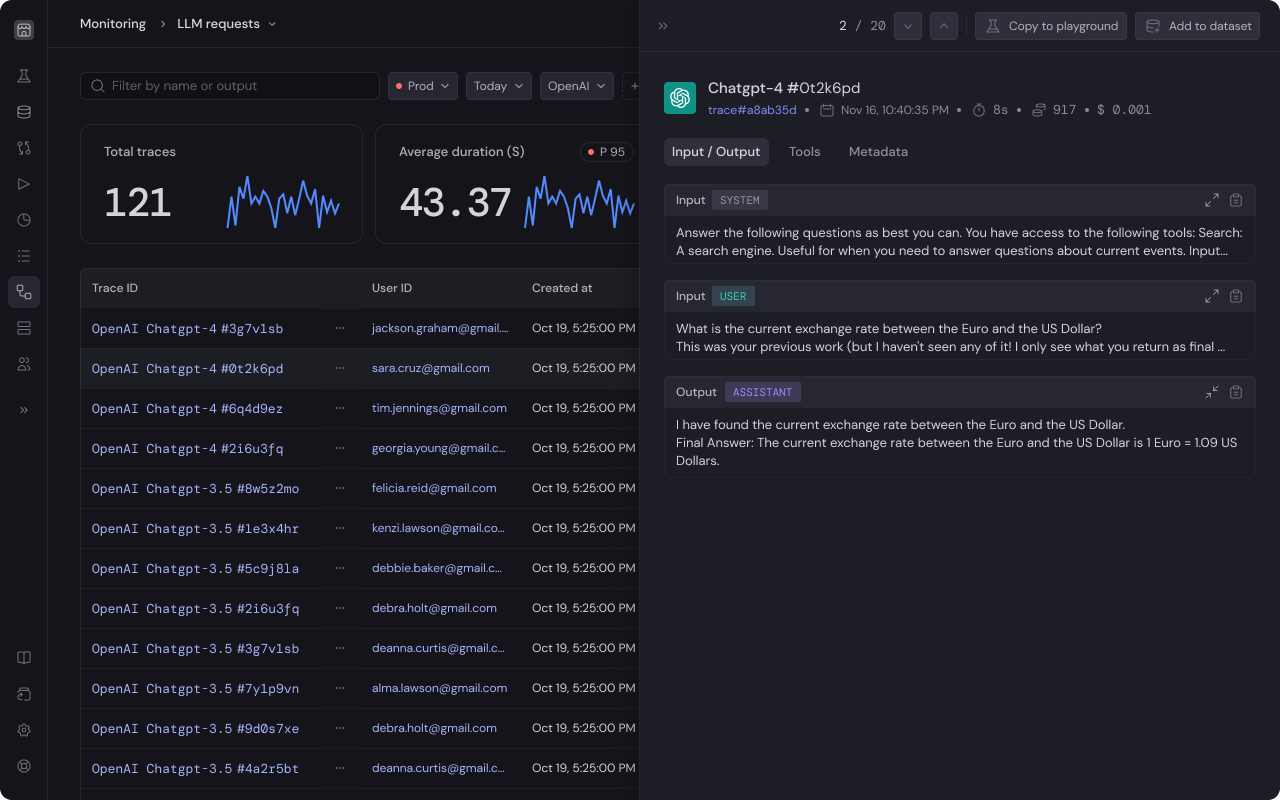
LLM request monitoring is used to track the execution of your AI model. These can be used to capture:
* Model configuration like model name, model configurations, prompt templates, etc.
* Execution details such as prompt tokens, completion tokens, cost, etc.
* API-level metrics like request latency, rate limit errors, etc.
* OpenAI tool calls in JSON format
 ### Use cases
For example, you are creating a AI travel agent to assist with booking trips. This bot needs to accurately gather flight ticket details from scrapping user emails. With logging LLM Request, you can:
1. **Track and Fix Errors:** Test the same task repeatedly to see how often and where your bot throws an errors.
2. **Ensure Quality:** Verify that your bot is correctly identifying flight prices, dates, and booking details. You can check if the bot is giving the user right response based on the email input.
3. **Improve User Experience:** Keep track of the response time for each request. This helps find any delays in the bot's responses, leading to improvement in how users interact with the bot.
### Instruction
If you haven't authorize Baserun, please refer to the [getting started with SDK > Authentication](/getstartedwithSDK/authentication) section for setup instructions.
### Example
```python python theme={null}
import baserun
import openai
def example():
response = openai.chat.completions.create(
model="gpt-3.5-turbo",
temperature=0.7,
messages=[
{
"role": "user",
"content": "What is the capital of the US?"
}
],
)
return response.choices[0].message
if __name__ == "__main__":
baserun.api_key = YOUR_BASERUN_API_KEY_HERE
openai.api_key = YOUR_OPEANI_API_KEY_HERE
baserun.init()
print(example())
```
```typescript typescript theme={null}
import { baserun } from "baserun";
import OpenAI from "openai";
async function main() {
await baserun.init();
const openai = new OpenAI();
const chatCompletion = await openai.chat.completions.create({
messages: [
{ role: "user", content: "What is the capital of the US?" },
],
model: "gpt-3.5-turbo",
});
// response
console.log(chatCompletion.choices[0].message.content);
}
main();
```
You can use Baserun with tests while iterating on your features, utilizing it for debugging and analysis, or in the production environment to monitor your application.
For more information refer to [Testing](/testing/overview).
## Tracing end-to-end pipeline
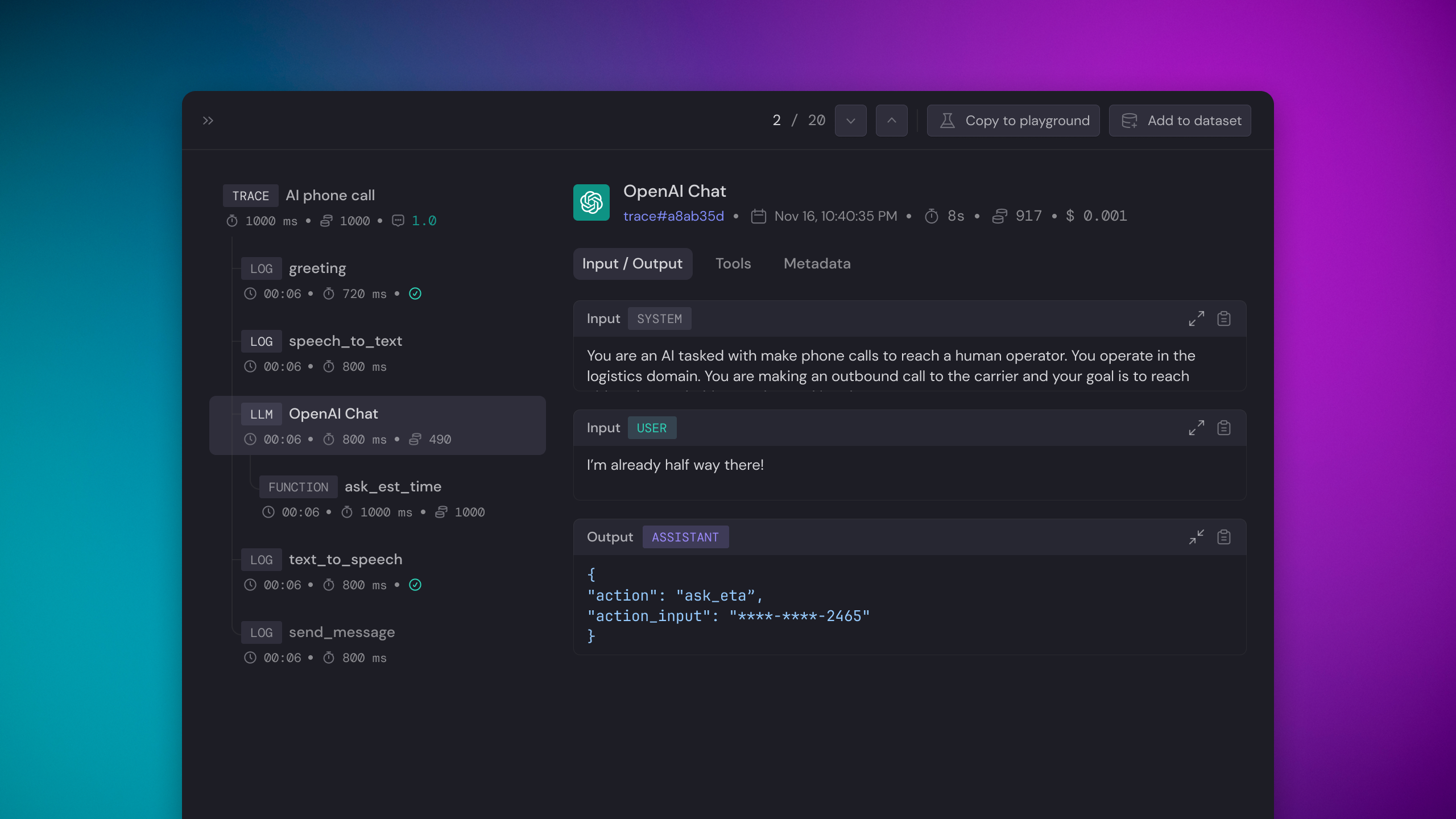
A Trace comprises a series of events executed within a pipeline. Tracing enables Baserun to capture and display the workflow's entire lifecycle, whether synchronous or asynchronous.
For example, consider the case of an AI bot used to automate phone calls. The process begins with the bot initiating a call to the user. While the call is in progress, the conversation is transcribed into text. Subsequently, the bot analyzes the transcribed text to produce a response or message. Once the response is crafted, it is converted into audio. Finally, the AI system transmits the audio message.
### Use cases
For example, you are creating a AI travel agent to assist with booking trips. This bot needs to accurately gather flight ticket details from scrapping user emails. With logging LLM Request, you can:
1. **Track and Fix Errors:** Test the same task repeatedly to see how often and where your bot throws an errors.
2. **Ensure Quality:** Verify that your bot is correctly identifying flight prices, dates, and booking details. You can check if the bot is giving the user right response based on the email input.
3. **Improve User Experience:** Keep track of the response time for each request. This helps find any delays in the bot's responses, leading to improvement in how users interact with the bot.
### Instruction
If you haven't authorize Baserun, please refer to the [getting started with SDK > Authentication](/getstartedwithSDK/authentication) section for setup instructions.
### Example
```python python theme={null}
import baserun
import openai
def example():
response = openai.chat.completions.create(
model="gpt-3.5-turbo",
temperature=0.7,
messages=[
{
"role": "user",
"content": "What is the capital of the US?"
}
],
)
return response.choices[0].message
if __name__ == "__main__":
baserun.api_key = YOUR_BASERUN_API_KEY_HERE
openai.api_key = YOUR_OPEANI_API_KEY_HERE
baserun.init()
print(example())
```
```typescript typescript theme={null}
import { baserun } from "baserun";
import OpenAI from "openai";
async function main() {
await baserun.init();
const openai = new OpenAI();
const chatCompletion = await openai.chat.completions.create({
messages: [
{ role: "user", content: "What is the capital of the US?" },
],
model: "gpt-3.5-turbo",
});
// response
console.log(chatCompletion.choices[0].message.content);
}
main();
```
You can use Baserun with tests while iterating on your features, utilizing it for debugging and analysis, or in the production environment to monitor your application.
For more information refer to [Testing](/testing/overview).
## Tracing end-to-end pipeline
A Trace comprises a series of events executed within a pipeline. Tracing enables Baserun to capture and display the workflow's entire lifecycle, whether synchronous or asynchronous.
For example, consider the case of an AI bot used to automate phone calls. The process begins with the bot initiating a call to the user. While the call is in progress, the conversation is transcribed into text. Subsequently, the bot analyzes the transcribed text to produce a response or message. Once the response is crafted, it is converted into audio. Finally, the AI system transmits the audio message.
 If you are using Next.js, please reference [Monitoring > Tracing with
Next.js](/monitoring/tracing-with-nextjs).
If you are using Lambda, please reference [Monitoring > Tracing with
Lambda](/monitoring/tracing-with-lambda).
### Instruction
To trace a function, wrap it with `baserun.trace`. In the following example, our workflow constitutes two LLM calls.
1. List out three activities to do on the moon
2. Choose the best activity among the three
### Example
```python python theme={null}
import baserun
import openai
def get_activities():
response = openai.chat.completions.create(
model="gpt-3.5-turbo",
temperature=0.7,
messages=[
{
"role": "user",
"content": "What are three activities to do on the Moon?"
}
],
)
return response.choices[0].message
@baserun.trace
def find_best_activity():
moon_activities = get_activities()
response = openai.chat.completions.create(
model="gpt-3.5-turbo",
temperature=0.7,
messages=[
{
"role": "user",
"content": "Pick the best activity to do on the moon from the following, including a convincing reason to do so.\n + {moon_activities}"
}
],
)
return response.choices[0].message
if __name__ == "__main__":
baserun.api_key = YOUR_BASERUN_API_KEY_HERE
openai.api_key = YOUR_OPEANI_API_KEY_HERE
baserun.init()
print(find_best_activity())
```
```typescript typescript theme={null}
import OpenAI from "openai";
import { baserun } from "baserun";
const openai = new OpenAI();
async function get_activities() {
const response = await openai.chat.completions.create({
model: "gpt-3.5-turbo",
temperature: 0.7,
messages: [
{
role: "user",
content: "What are three activities to do on the Moon?",
},
],
});
return response.choices[0].message;
}
async function find_best_activity() {
const moon_activities = await get_activities();
const response = await openai.chat.completions.create({
model: "gpt-3.5-turbo",
temperature: 0.7,
messages: [
{
role: "user",
content: `Pick the best activity to do on the moon from the following, including a convincing reason to do so.
${moon_activities.content}`,
},
],
});
return response.choices[0].message;
}
async function main() {
await baserun.init({
apiKey: YOUR_BASERUN_API_KEY_HERE,
});
const workflow = baserun.trace(async () => {
const best_activity = await find_best_activity();
console.log(best_activity);
return best_activity;
}, "Tracing multi-Step");
await workflow();
}
main();
```
## Demo projects
[Python example repo](https://github.com/baserun-ai/testing-agent/),
If you are using Next.js, please reference [Monitoring > Tracing with
Next.js](/monitoring/tracing-with-nextjs).
If you are using Lambda, please reference [Monitoring > Tracing with
Lambda](/monitoring/tracing-with-lambda).
### Instruction
To trace a function, wrap it with `baserun.trace`. In the following example, our workflow constitutes two LLM calls.
1. List out three activities to do on the moon
2. Choose the best activity among the three
### Example
```python python theme={null}
import baserun
import openai
def get_activities():
response = openai.chat.completions.create(
model="gpt-3.5-turbo",
temperature=0.7,
messages=[
{
"role": "user",
"content": "What are three activities to do on the Moon?"
}
],
)
return response.choices[0].message
@baserun.trace
def find_best_activity():
moon_activities = get_activities()
response = openai.chat.completions.create(
model="gpt-3.5-turbo",
temperature=0.7,
messages=[
{
"role": "user",
"content": "Pick the best activity to do on the moon from the following, including a convincing reason to do so.\n + {moon_activities}"
}
],
)
return response.choices[0].message
if __name__ == "__main__":
baserun.api_key = YOUR_BASERUN_API_KEY_HERE
openai.api_key = YOUR_OPEANI_API_KEY_HERE
baserun.init()
print(find_best_activity())
```
```typescript typescript theme={null}
import OpenAI from "openai";
import { baserun } from "baserun";
const openai = new OpenAI();
async function get_activities() {
const response = await openai.chat.completions.create({
model: "gpt-3.5-turbo",
temperature: 0.7,
messages: [
{
role: "user",
content: "What are three activities to do on the Moon?",
},
],
});
return response.choices[0].message;
}
async function find_best_activity() {
const moon_activities = await get_activities();
const response = await openai.chat.completions.create({
model: "gpt-3.5-turbo",
temperature: 0.7,
messages: [
{
role: "user",
content: `Pick the best activity to do on the moon from the following, including a convincing reason to do so.
${moon_activities.content}`,
},
],
});
return response.choices[0].message;
}
async function main() {
await baserun.init({
apiKey: YOUR_BASERUN_API_KEY_HERE,
});
const workflow = baserun.trace(async () => {
const best_activity = await find_best_activity();
console.log(best_activity);
return best_activity;
}, "Tracing multi-Step");
await workflow();
}
main();
```
## Demo projects
[Python example repo](https://github.com/baserun-ai/testing-agent/),
[Typescript example repo](https://github.com/baserun-ai/testing-agent-js)
If you have any questions or feature requests, join our [Discord channel](https://discord.com/invite/xEPFsvSmkb) or send us an email at [hello@baserun.ai](mailto:hello@baserun.ai)
Add trace name, set trace result, add custom metadata
Logging non-LLM API calls or custom functions