> ## Documentation Index
> Fetch the complete documentation index at: https://docs.baserun.ai/llms.txt
> Use this file to discover all available pages before exploring further.
# Advanced tracing features
> Tracing additional data such as trace name, custom log, session ID, etc.
Update your Python SDK to version 2.0 for enhanced stability and easier
integration. [Learn more](../SDK_2.0/python/tracing)
This page goes over some advanced tracing features.
## Adding a trace name
If you're tracing multiple functions, you can use the `name` parameter to distinguish between them:
```python python theme={null}
def ask_question(question="What is the capital of the US?") -> str:
with baserun.start_trace(name="General knowledge question"):
# Your code here
```
```typescript typescript theme={null}
const askQuestion = baserun.trace(
async (question = "What is the capital of the US?") => {
// Your code here
},
"General knowledge question" // Trace name
);
```
 Currently, when using python sdk, you can name a trace only when using
`baserun.start_trace` context manager and it's not possible to do so when
using `@baserun.trace` decorator.
## Setting a trace's result
By default a trace's `result` value will be the return value of the function or context that is traced. If you want to be more explicit, you can set the `result` value of a trace.
```python python theme={null}
def ask_question(question="What is the capital of the US?") -> str:
with baserun.start_trace() as trace:
# Your code here, for example:
answer_id = answer_question(question)
trace.result = my_result
```
```typescript typescript theme={null}
const workflow = baserun.trace(async () => {
// some llm calls or other logic here
return "my result"
}, "trace name")
```
Currently, when using python sdk, you can name a trace only when using
`baserun.start_trace` context manager and it's not possible to do so when
using `@baserun.trace` decorator.
## Setting a trace's result
By default a trace's `result` value will be the return value of the function or context that is traced. If you want to be more explicit, you can set the `result` value of a trace.
```python python theme={null}
def ask_question(question="What is the capital of the US?") -> str:
with baserun.start_trace() as trace:
# Your code here, for example:
answer_id = answer_question(question)
trace.result = my_result
```
```typescript typescript theme={null}
const workflow = baserun.trace(async () => {
// some llm calls or other logic here
return "my result"
}, "trace name")
```
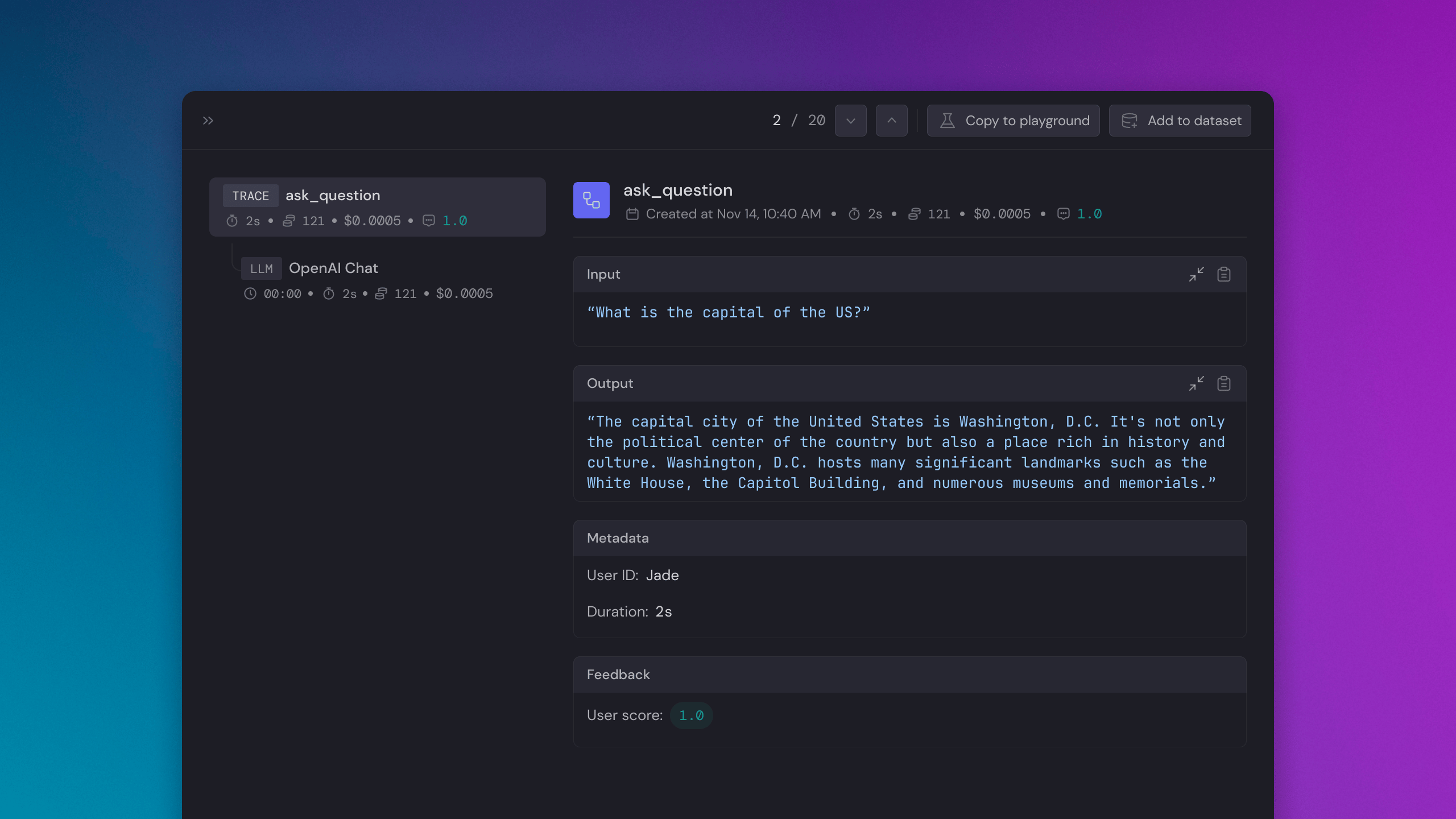 ## Adding custom metadata
You can also add custom metadata. This metadata could be whatever you like, provided that it is JSON serializable. For instance, you may want to include references to other objects or systems.
```python python theme={null}
def ask_question(question="What is the capital of the US?") -> str:
with baserun.start_trace(name="Answer question") as trace:
# Make a completion
completion = client.chat.completions.create(
model="gpt-4-1106-preview",
messages=[{"role": "user", "content": question}],
)
# Your code here, for example:
answer_id = persist_answer(question, completion)
# Add whatever metadata you like
trace.metadata = {
"answer_id": answer_id
}
```
```typescript typescript theme={null}
import { baserun } from "baserun"
const workflow = baserun.trace(
async () => {
const openai = new OpenAI();
const chatCompletion = await openai.chat.completions.create({
messages: [
{ role: "user", content: "What are is the capital of the US?" },
],
model: "gpt-3.5-turbo",
});
return chatCompletion.choices[0].message.content
},
{
name: "Answer question",
metadata: {
requestId: "1234",
},
}
)
```
## Adding custom metadata
You can also add custom metadata. This metadata could be whatever you like, provided that it is JSON serializable. For instance, you may want to include references to other objects or systems.
```python python theme={null}
def ask_question(question="What is the capital of the US?") -> str:
with baserun.start_trace(name="Answer question") as trace:
# Make a completion
completion = client.chat.completions.create(
model="gpt-4-1106-preview",
messages=[{"role": "user", "content": question}],
)
# Your code here, for example:
answer_id = persist_answer(question, completion)
# Add whatever metadata you like
trace.metadata = {
"answer_id": answer_id
}
```
```typescript typescript theme={null}
import { baserun } from "baserun"
const workflow = baserun.trace(
async () => {
const openai = new OpenAI();
const chatCompletion = await openai.chat.completions.create({
messages: [
{ role: "user", content: "What are is the capital of the US?" },
],
model: "gpt-3.5-turbo",
});
return chatCompletion.choices[0].message.content
},
{
name: "Answer question",
metadata: {
requestId: "1234",
},
}
)
```
 ## Associating with an LLM request
By default, annotations such as logs and checks are associated with a trace as a whole. To associate a with particular LLM request, you simply need to pass the completion ID from your LLM request. To do so using OpenAI's SDK, you can do the following:
```python python theme={null}
@baserun.trace
def ask_question(question="What is the capital of the US?") -> str:
completion = client.chat.completions.create(
model="gpt-4-1106-preview",
messages=[{"role": "user", "content": question}],
)
# Your code here, for example:
answer = persist_answer(question, completion)
# Create the annotation
annotation = baserun.annotate(completion.id)
# Capture whatever annotations you need
annotation.log("Answer", metadata={"answer_id": answer.id})
# Make sure to submit the annotation
annotation.submit()
```
```typescript typescript theme={null}
const workflow = baserun.trace(async (question="What is the capital of the US?") => {
const completion = await openai.chat.completions.create({
model: "gpt-4-1106-preview",
messages: [
{
role: "user",
content: question,
},
],
});
// Your code here, for example:
const answer = await persist_answer(question, completion)
// Create the annotation
const annotation = baserun.annotate(completion.id);
// Capture whatever annotations you need
annotation.log("Answer", {answer_id: answer.id})
// Make sure to submit the annotation
await annotation.submit();
});
await workflow();
```
Here is how the user feedback will look like in Baserun dashboard:
## Associating with an LLM request
By default, annotations such as logs and checks are associated with a trace as a whole. To associate a with particular LLM request, you simply need to pass the completion ID from your LLM request. To do so using OpenAI's SDK, you can do the following:
```python python theme={null}
@baserun.trace
def ask_question(question="What is the capital of the US?") -> str:
completion = client.chat.completions.create(
model="gpt-4-1106-preview",
messages=[{"role": "user", "content": question}],
)
# Your code here, for example:
answer = persist_answer(question, completion)
# Create the annotation
annotation = baserun.annotate(completion.id)
# Capture whatever annotations you need
annotation.log("Answer", metadata={"answer_id": answer.id})
# Make sure to submit the annotation
annotation.submit()
```
```typescript typescript theme={null}
const workflow = baserun.trace(async (question="What is the capital of the US?") => {
const completion = await openai.chat.completions.create({
model: "gpt-4-1106-preview",
messages: [
{
role: "user",
content: question,
},
],
});
// Your code here, for example:
const answer = await persist_answer(question, completion)
// Create the annotation
const annotation = baserun.annotate(completion.id);
// Capture whatever annotations you need
annotation.log("Answer", {answer_id: answer.id})
// Make sure to submit the annotation
await annotation.submit();
});
await workflow();
```
Here is how the user feedback will look like in Baserun dashboard:
 ## Example
```python python theme={null}
import baserun
import openai
PROMPT = """As a customer service representative for an online pet product retailer, your main goal is to
provide a positive and informative chat experience for customers..."""
def run_chatbot():
"""A basic chatbot"""
client = openai.OpenAI()
conversation = [{"role": "system", "content": PROMPT}]
print(f"Start your conversation. Type `exit` to end the conversation.")
user_input = input(">")
conversation.append({"role": "user", "content": user_input})
# Start a trace before your first OpenAI call, giving it a name
with baserun.start_trace(name="Chatbot CLI loop") as trace:
# Tracing allows each iteration's LLM calls to be grouped together
while user_input != "exit":
completion = client.chat.completions.create(
model="gpt-4-1106-preview",
messages=conversation,
)
content = completion.choices[0].message.content
conversation.append({"role": "assistant", "content": content})
print(content)
user_input = input(">")
conversation.append({"role": "user", "content": user_input})
# Set the trace result for display in the Baserun UI (here it is set to the last content of the conversation)
trace.result = conversation[-1]["content"]
if **name** == "**main**":
baserun.api_key = YOUR_BASERUN_API_KEY_HERE
openai.api_key = YOUR_OPENAI_API_KEY_HERE
baserun.init()
run_chatbot()
```
```typescript typescript theme={null}
import OpenAI from "openai";
import { baserun } from "baserun";
import readlineSync from "readline-sync";
import { ChatCompletionMessageParam } from "openai/src/resources/chat/completions";
const client = new OpenAI({ apiKey: YOUR_OPENAI_API_KEY_HERE });
const PROMPT =
"As a customer service representative for an online pet product retailer, your main goal is to provide a positive and informative chat experience for customers...";
async function main() {
await baserun.init({
apiKey: YOUR_BASERUN_API_KEY_HERE,
});
const workflow = baserun.trace(async () => {
const conversation: ChatCompletionMessageParam[] = [
{ role: "system", content: PROMPT },
];
let user_input = readlineSync.question(
"Start your conversation. Type `exit` to end the conversation.\n> ",
);
while (user_input !== "exit") {
conversation.push({ role: "user", content: user_input });
const completion = await client.chat.completions.create({
model: "gpt-4-1106-preview",
messages: conversation,
});
const content = completion.choices[0].message.content!;
conversation.push({ role: "assistant", content: content });
user_input = readlineSync.question(`${content}\n> `);
}
// return for display in the Baserun UI (here we're returning the last content of the conversation)
return conversation[conversation.length - 1].content;
}, "Chatbot CLI loop");
await workflow();
}
main();
```
## Example
```python python theme={null}
import baserun
import openai
PROMPT = """As a customer service representative for an online pet product retailer, your main goal is to
provide a positive and informative chat experience for customers..."""
def run_chatbot():
"""A basic chatbot"""
client = openai.OpenAI()
conversation = [{"role": "system", "content": PROMPT}]
print(f"Start your conversation. Type `exit` to end the conversation.")
user_input = input(">")
conversation.append({"role": "user", "content": user_input})
# Start a trace before your first OpenAI call, giving it a name
with baserun.start_trace(name="Chatbot CLI loop") as trace:
# Tracing allows each iteration's LLM calls to be grouped together
while user_input != "exit":
completion = client.chat.completions.create(
model="gpt-4-1106-preview",
messages=conversation,
)
content = completion.choices[0].message.content
conversation.append({"role": "assistant", "content": content})
print(content)
user_input = input(">")
conversation.append({"role": "user", "content": user_input})
# Set the trace result for display in the Baserun UI (here it is set to the last content of the conversation)
trace.result = conversation[-1]["content"]
if **name** == "**main**":
baserun.api_key = YOUR_BASERUN_API_KEY_HERE
openai.api_key = YOUR_OPENAI_API_KEY_HERE
baserun.init()
run_chatbot()
```
```typescript typescript theme={null}
import OpenAI from "openai";
import { baserun } from "baserun";
import readlineSync from "readline-sync";
import { ChatCompletionMessageParam } from "openai/src/resources/chat/completions";
const client = new OpenAI({ apiKey: YOUR_OPENAI_API_KEY_HERE });
const PROMPT =
"As a customer service representative for an online pet product retailer, your main goal is to provide a positive and informative chat experience for customers...";
async function main() {
await baserun.init({
apiKey: YOUR_BASERUN_API_KEY_HERE,
});
const workflow = baserun.trace(async () => {
const conversation: ChatCompletionMessageParam[] = [
{ role: "system", content: PROMPT },
];
let user_input = readlineSync.question(
"Start your conversation. Type `exit` to end the conversation.\n> ",
);
while (user_input !== "exit") {
conversation.push({ role: "user", content: user_input });
const completion = await client.chat.completions.create({
model: "gpt-4-1106-preview",
messages: conversation,
});
const content = completion.choices[0].message.content!;
conversation.push({ role: "assistant", content: content });
user_input = readlineSync.question(`${content}\n> `);
}
// return for display in the Baserun UI (here we're returning the last content of the conversation)
return conversation[conversation.length - 1].content;
}, "Chatbot CLI loop");
await workflow();
}
main();
```