> ## Documentation Index
> Fetch the complete documentation index at: https://docs.baserun.ai/llms.txt
> Use this file to discover all available pages before exploring further.
# Tracing end-to-end LLM pipelines
### Introduction
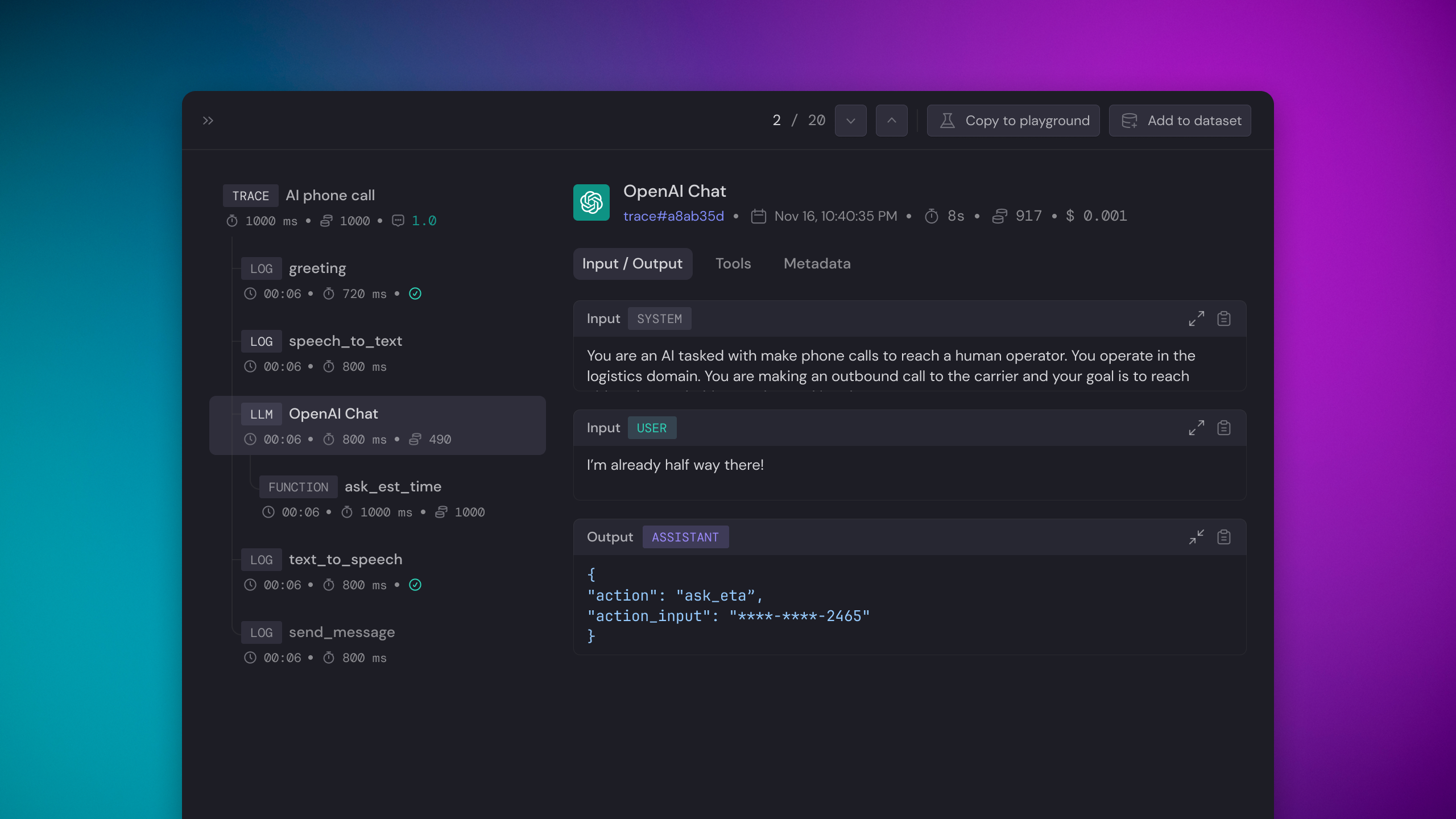
A Trace comprises a series of events executed within an LLM chain(workflow). Tracing enables Baserun to capture and display the LLM chain's entire lifecycle, whether synchronous or asynchronous.
Tracing LLM chains allows you to debug your application, monitor your LLM chains' performance, and also collect user feedback.
 ### Use cases
Please reference the [Monitoring Overview](/monitoring/overview) to learn why logging LLM chain is critical for LLM feature development.
### Features
* Is model and framework agnostic
* analysis UI to show sequence of events
* Provides token usage, estimated cost, duration, input, and output
* Supports evaluation
* Supports annotation
* Supports user feedback
* Supports async functions
* Option to add custom trace name
* Option to log custom metadata
* Option to set trace result
If you are using Next.js, please reference [Monitoring > Tracing with
Next.js](/monitoring/tracing-with-nextjs).
If you are using Lambda, please reference [Monitoring > Tracing with
Lambda](/monitoring/tracing-with-lambda).
### Instruction
The first 3 steps are the same as the [Logging LLM requests tutorial](/getstartedwithSDK/logging-LLM-requests). So, if you have already done this before, jump to step 4.
```bash python theme={null}
pip install baserun
```
```bash typescript theme={null}
npm install baserun
# or
yarn add baserun
```
Create an account at [https://app.baserun.ai/sign-up](https://app.baserun.ai/sign-up). Then generate an API key for your project in the [settings](https://app.baserun.ai/settings) tab. Set it as an environment variable:
```bash theme={null}
export BASERUN_API_KEY="your_api_key_here"
```
Alternatively set the Baserun API key when initializing the SDK
```python python theme={null}
import baserun
baserun.api_key = "br-..."
baserun.init()
```
```typescript typescript theme={null}
import { baserun } from "baserun";
// init needs to be awaited. If top-level await is not available, wrap it in an async function,
// but make sure it is called before instantiating OpenAI, Anthropic or Replicate
await baserun.init({
apiKey: "br-...",
});
```
At your application's startup, define the environment in which you'd like to run Baserun. You can use Baserun in the development environment while iterating on your features, utilizing it for debugging and analysis, or in the production environment to monitor your application.
```python python theme={null}
import baserun
baserun.init()
```
```typescript typescript theme={null}
import { baserun } from "baserun";
// in your main function
// init needs to be awaited. If top-level await is not available, wrap it in an async function,
// but make sure it is called before instantiating OpenAI, Anthropic or Replicate
await baserun.init();
```
The function(s) to trace are ultimately dependent on your app. It could be a main() function, or it could be a handler for an API call.
Note for TS/JS: Make sure to always call `await baserun.init()` before you instantiate OpenAI, Anthropic or Replicate.
```python python theme={null}
# Decorate the function that you would like to trace:
import baserun
@baserun.trace
def get_response(message):
...
```
```typescript typescript theme={null}
import { baserun } from 'baserun'
const getResponse = baserun.trace((message: string) => {
...
}, 'getResponse')
```
### Full Example
```python python theme={null}
import baserun
import openai
def get_activities():
response = openai.chat.completions.create(
model="gpt-3.5-turbo",
temperature=0.7,
messages=[
{
"role": "user",
"content": "What are three activities to do on the Moon?"
}
],
)
return response.choices[0].message.content
@baserun.trace
def find_best_activity():
moon_activities = get_activities()
response = openai.chat.completions.create(
model="gpt-3.5-turbo",
temperature=0.7,
messages=[
{
"role": "user",
"content": "Pick the best activity to do on the moon from the following, including a convincing reason to do so.\n + {moon_activities}"
}
],
)
return response.choices[0].message.content
if __name__ == "__main__":
baserun.api_key = YOUR_BASERUN_API_KEY_HERE
openai.api_key = YOUR_OPEANI_API_KEY_HERE
baserun.init()
print(find_best_activity())
```
```typescript typescript theme={null}
import OpenAI from 'openai';
import { baserun } from 'baserun';
const openai = new OpenAI();
async function get_activities() {
const response = await openai.chat.completions.create({
model: 'gpt-3.5-turbo',
temperature: 0.7,
messages: [
{
role: 'user',
content: 'What are three activities to do on the Moon?',
},
],
});
return response.choices[0].message.content;
}
async function find_best_activity() {
const moon_activities = await get_activities();
const response = await openai.chat.completions.create({
model: 'gpt-3.5-turbo',
temperature: 0.7,
messages: [
{
role: 'user',
content: `Pick the best activity to do on the moon from the following, including a convincing reason to do so.
${moon_activities.content}`,
},
],
});
return response.choices[0].message.content;
}
async function main() {
await baserun.init({
apiKey: YOUR_BASERUN_API_KEY_HERE,
});
const workflow = baserun.trace(async () => {
const best_activity = await find_best_activity();
console.log(best_activity);
return best_activity;
}, 'Tracing multi-Step');
await workflow();
}
main();
```
Congrats, you are done! Now, you can navigate to the monitoring tab. Here is what you will see interact with your application:
### Use cases
Please reference the [Monitoring Overview](/monitoring/overview) to learn why logging LLM chain is critical for LLM feature development.
### Features
* Is model and framework agnostic
* analysis UI to show sequence of events
* Provides token usage, estimated cost, duration, input, and output
* Supports evaluation
* Supports annotation
* Supports user feedback
* Supports async functions
* Option to add custom trace name
* Option to log custom metadata
* Option to set trace result
If you are using Next.js, please reference [Monitoring > Tracing with
Next.js](/monitoring/tracing-with-nextjs).
If you are using Lambda, please reference [Monitoring > Tracing with
Lambda](/monitoring/tracing-with-lambda).
### Instruction
The first 3 steps are the same as the [Logging LLM requests tutorial](/getstartedwithSDK/logging-LLM-requests). So, if you have already done this before, jump to step 4.
```bash python theme={null}
pip install baserun
```
```bash typescript theme={null}
npm install baserun
# or
yarn add baserun
```
Create an account at [https://app.baserun.ai/sign-up](https://app.baserun.ai/sign-up). Then generate an API key for your project in the [settings](https://app.baserun.ai/settings) tab. Set it as an environment variable:
```bash theme={null}
export BASERUN_API_KEY="your_api_key_here"
```
Alternatively set the Baserun API key when initializing the SDK
```python python theme={null}
import baserun
baserun.api_key = "br-..."
baserun.init()
```
```typescript typescript theme={null}
import { baserun } from "baserun";
// init needs to be awaited. If top-level await is not available, wrap it in an async function,
// but make sure it is called before instantiating OpenAI, Anthropic or Replicate
await baserun.init({
apiKey: "br-...",
});
```
At your application's startup, define the environment in which you'd like to run Baserun. You can use Baserun in the development environment while iterating on your features, utilizing it for debugging and analysis, or in the production environment to monitor your application.
```python python theme={null}
import baserun
baserun.init()
```
```typescript typescript theme={null}
import { baserun } from "baserun";
// in your main function
// init needs to be awaited. If top-level await is not available, wrap it in an async function,
// but make sure it is called before instantiating OpenAI, Anthropic or Replicate
await baserun.init();
```
The function(s) to trace are ultimately dependent on your app. It could be a main() function, or it could be a handler for an API call.
Note for TS/JS: Make sure to always call `await baserun.init()` before you instantiate OpenAI, Anthropic or Replicate.
```python python theme={null}
# Decorate the function that you would like to trace:
import baserun
@baserun.trace
def get_response(message):
...
```
```typescript typescript theme={null}
import { baserun } from 'baserun'
const getResponse = baserun.trace((message: string) => {
...
}, 'getResponse')
```
### Full Example
```python python theme={null}
import baserun
import openai
def get_activities():
response = openai.chat.completions.create(
model="gpt-3.5-turbo",
temperature=0.7,
messages=[
{
"role": "user",
"content": "What are three activities to do on the Moon?"
}
],
)
return response.choices[0].message.content
@baserun.trace
def find_best_activity():
moon_activities = get_activities()
response = openai.chat.completions.create(
model="gpt-3.5-turbo",
temperature=0.7,
messages=[
{
"role": "user",
"content": "Pick the best activity to do on the moon from the following, including a convincing reason to do so.\n + {moon_activities}"
}
],
)
return response.choices[0].message.content
if __name__ == "__main__":
baserun.api_key = YOUR_BASERUN_API_KEY_HERE
openai.api_key = YOUR_OPEANI_API_KEY_HERE
baserun.init()
print(find_best_activity())
```
```typescript typescript theme={null}
import OpenAI from 'openai';
import { baserun } from 'baserun';
const openai = new OpenAI();
async function get_activities() {
const response = await openai.chat.completions.create({
model: 'gpt-3.5-turbo',
temperature: 0.7,
messages: [
{
role: 'user',
content: 'What are three activities to do on the Moon?',
},
],
});
return response.choices[0].message.content;
}
async function find_best_activity() {
const moon_activities = await get_activities();
const response = await openai.chat.completions.create({
model: 'gpt-3.5-turbo',
temperature: 0.7,
messages: [
{
role: 'user',
content: `Pick the best activity to do on the moon from the following, including a convincing reason to do so.
${moon_activities.content}`,
},
],
});
return response.choices[0].message.content;
}
async function main() {
await baserun.init({
apiKey: YOUR_BASERUN_API_KEY_HERE,
});
const workflow = baserun.trace(async () => {
const best_activity = await find_best_activity();
console.log(best_activity);
return best_activity;
}, 'Tracing multi-Step');
await workflow();
}
main();
```
Congrats, you are done! Now, you can navigate to the monitoring tab. Here is what you will see interact with your application:
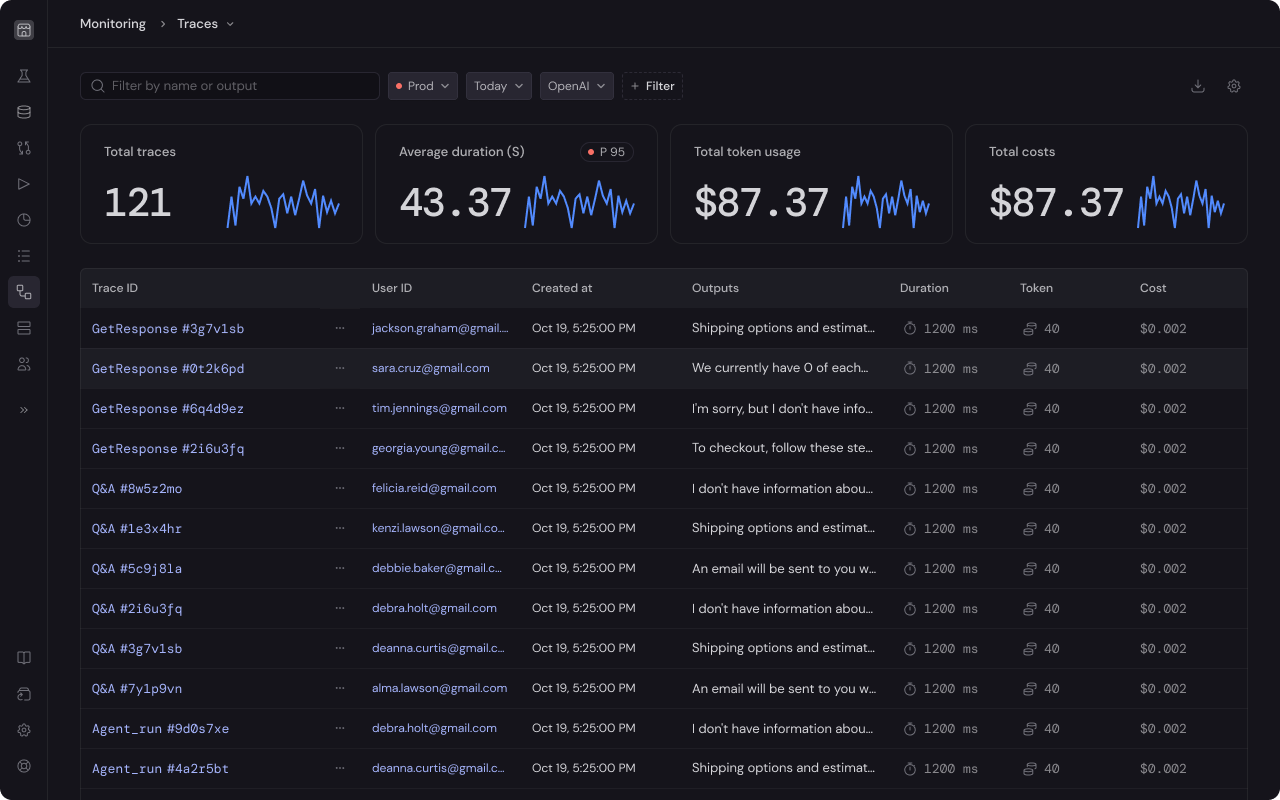 Optionally, you can add metadata like trace name, user ID, and session ID to aid in debugging. Read [Logging > Advanced tracing features](/monitoring/advanced-tracing) for more details.
## Demo projects
[Python example repo](https://github.com/baserun-ai/testing-agent/),
Optionally, you can add metadata like trace name, user ID, and session ID to aid in debugging. Read [Logging > Advanced tracing features](/monitoring/advanced-tracing) for more details.
## Demo projects
[Python example repo](https://github.com/baserun-ai/testing-agent/),
[Typescript example repo](https://github.com/baserun-ai/testing-agent-js)
If you have any questions or feature requests, join our [Discord channel](https://discord.com/invite/xEPFsvSmkb) or send us an email at [hello@baserun.ai](mailto:hello@baserun.ai)