> ## Documentation Index
> Fetch the complete documentation index at: https://docs.baserun.ai/llms.txt
> Use this file to discover all available pages before exploring further.
# Tracing
## Logging LLM requests
Get insight into individual LLM request, including prompt templates, input, output, duration, token usage cost, etc. Collect datasets for continuous iterations (fine-tuning, testing).
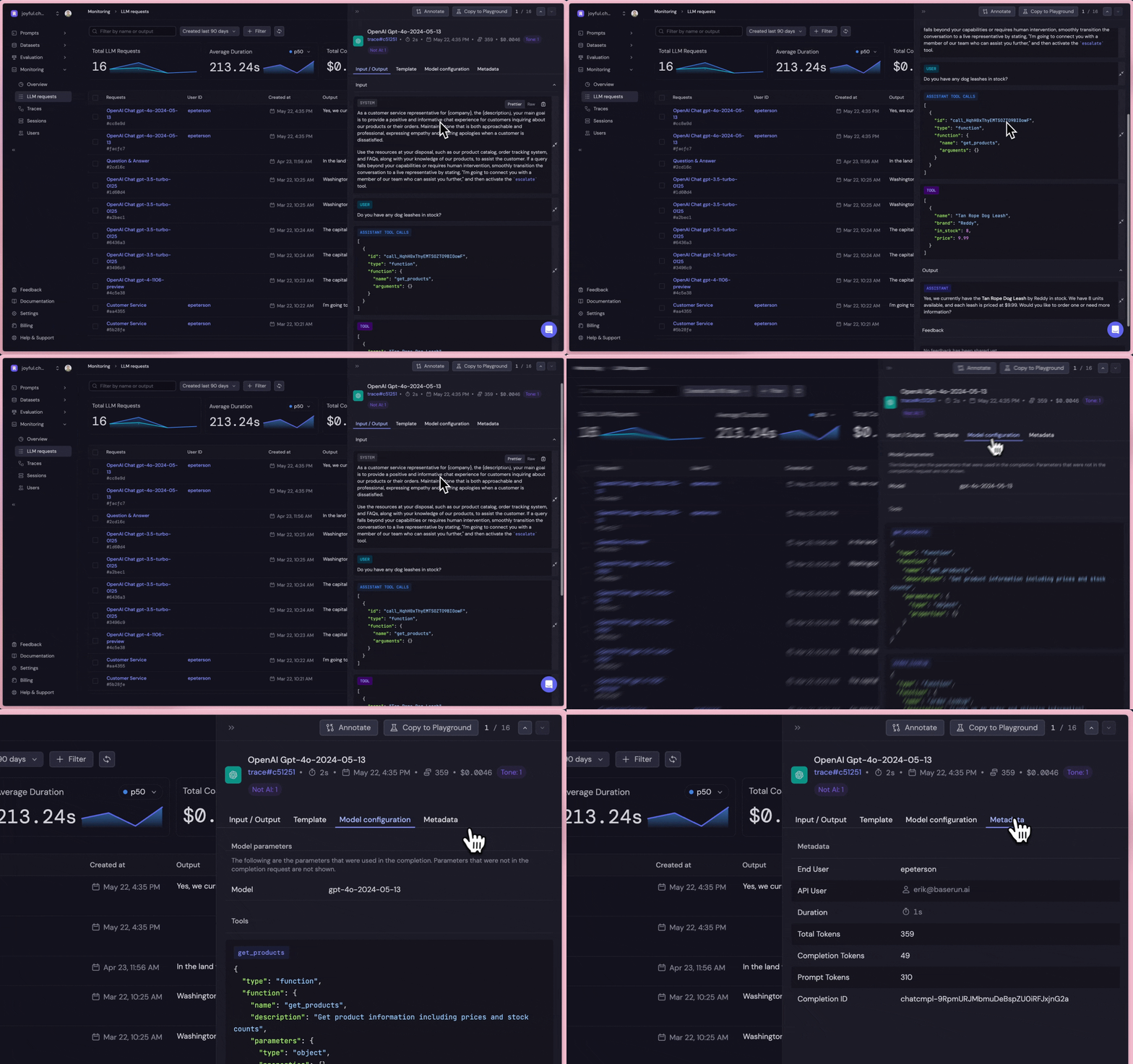 An
An LLM request represents a single query to an LLM provider. Baserun refers to the returned object as a Completion.
If the request is successful, Baserun logs the completion in the UI as shown above.
A completion includes the input and output of the request, along with metadata such as the user, request ID, and model configurations.
If the request fails, Baserun logs the error code and message in the LLM requests table.
### Arguments
Beyond the default settings, users can customize additional arguments to improve analysis and data collection:
Specify the following properties as keyword arguments when creating an LLM request (e.g., using completions.create). These can also be adjusted on the completions object returned by the client.
```python theme={null}
client.chat.completions.create(
name: Optional[str],
user: Optional[str],
session: Optional[str],
metadata: Optional[Dict]
) -> Completion:
```
Custom name of the LLM request
Created by Baserun but can be overridden by the user.
Inherited from the parent trace if there is one, unless a `user` argument is
passed when creating the completion.
These arguments also apply to other completion-generating functions such as `stream`.
### Instructions
```bash theme={null}
pip install baserun
```
Create an account at [https://app.baserun.ai/sign-up](https://app.baserun.ai/sign-up). Then generate an API key for your project in the [settings](https://app.baserun.ai/settings) tab. Set it as an environment variable:
```bash theme={null}
export BASERUN_API_KEY="your_api_key_here"
```
In order to have Baserun trace your LLM Requests, all you need to do is import OpenAI from baserun instead of openAI. Creating an OpenAI client object automatically starts the trace, and all future LLM requests made with this client object will be captured.
```python theme={null}
from baserun import OpenAI
def example():
client = OpenAI()
completion = client.chat.completions.create(
name="Paris Activities",
model="gpt-4o",
temperature=0.7,
messages=[
{
"role": "user",
"content": "What are three activities to do in Paris?"
}
],
)
if __name__ == "__main__":
print(example())
```
If you don't wish to use Baserun's OpenAI client, you can simply wrap your normal OpenAI client using init.
```python theme={null}
from baserun import init
client = init(OpenAI())
completion = client.chat.completions.create(
...
)
```
## Tracing end-to-end pipelines
A **Trace** comprises a series of events executed within an LLM chain (also called a workflow, among other names). Tracing enables Baserun to capture and display the LLM chain's entire lifecycle, whether synchronous or asynchronous.
Using Baserun, traces are tied to the client object of the library you are using. For example, if you are using the OpenAI library, you would create an `OpenAI` client object imported from `baserun`. When that client object is used all completions are automatically traced.
### Arguments
These arguments can be passed when instantiating your client object, or can be set after instantiation.
```python theme={null}
OpenAI(name: str, **kwargs) -> OpenAI:
```
Custom name of the trace
Created by Baserun but can be overridden by the user.
An identifier for the end user. Can be any string, e.g. a user ID or email.
An identifier for the current session. For example, you might user a session ID from your application framework or authenticiation library.
The output or outcome of the trace.
Extra metadata to attach to the trace.
### Instructions
In the following example, this pipeline has two LLM calls. Create a client at the beginning of the function you want to trace, and pass the client anywhere you want to use the same trace.
```python theme={null}
from baserun import OpenAI
def get_activities(client: OpenAI):
response = client.chat.completions.create(
model="gpt-4o",
temperature=0.7,
messages=[
{
"role": "user",
"content": "What are three activities to do on the Moon?"
}
],
)
return response.choices[0].message
def find_best_activity():
client = OpenAI()
client.name = "find_best_activity"
client.user = "user123"
client.session = "session123"
moon_activities = get_activities(client)
response = client.chat.completions.create(
model="gpt-4o",
temperature=0.7,
messages=[
{
"role": "user",
"content": "Pick the best activity to do on the moon from the following, including a convincing reason to do so.\n + {moon_activities}"
}
],
)
client.result = "success"
return response.choices[0].message
```
Alternatively, you can associate two events with the same trace or resume a trace using the trace\_id. If you wish to associate an LLM request with a trace after the trace has completed, see the example below. Another common use case is when you want to add user feedback or tags to a trace after the pipeline has finished executing.
```python theme={null}
from baserun import OpenAI
def main():
main_trace_id = str(uuid4())
activities = get_activities(main_trace_id)
find_best_activity(main_trace_id, activities)
def get_activities(trace_id: str) -> str:
client = OpenAI(trace_id=trace_id)
response = client.chat.completions.create(
model="gpt-4o",
temperature=0.7,
messages=[
{
"role": "user",
"content": "What are three activities to do on the Moon?"
}
],
)
return response.choices[0].message
def find_best_activity(trace_id: str, activities: str) -> str:
client = OpenAI(trace_id=trace_id)
client.name = "find_best_activity"
response = client.chat.completions.create(
model="gpt-4o",
temperature=0.7,
messages=[
{
"role": "user",
"content": "Pick the best activity to do on the moon from the following, including a convincing reason to do so.\n + {activities}"
}
],
)
client.result = "success"
return response.choices[0].message
```
### Supported Models
At the moment, the Baserun Python SDK 2.0 supports all models using OpenAI library and Anthropic library, regardless of the underlying model's provider. We are continuously adding support for new models. If you have a specific model you would like to use, please reach out to us at [hello@baserun.ai](mailto:hello@baserun.ai) or [join our community](https://discord.gg/EtR7NFQ4).
If you use another provider or library, you can still use Baserun by manually creating "generic" objects. Notably, generic completions must be submitted explicitly using `submit_to_baserun()`. Here's what that looks like:
```python theme={null}
from baserun.wrappers.generic import (
GenericChoice,
GenericClient,
GenericCompletion,
GenericCompletionMessage,
GenericInputMessage,
)
question = "What is the capital of the US?"
response = call_my_custom_model(question)
client = GenericClient(name="My Traced Client")
completion = GenericCompletion(
model="my custom model",
name="My Completion",
input_messages=[GenericInputMessage(content=question, role="user")],
choices=[GenericChoice(message=GenericCompletionMessage(content=response))],
client=client,
trace_id=client.trace_id,
)
completion.submit_to_baserun()
```